2. Usage
System Requirements
Myosin is best applied on embedded linux platforms. Some features are only compatible with POSIX compliant systems. Cross-platform support for all features is not currently being pursued.
Supported Python Versions
The following table outlines the distributions and testing support against different Python versions:
Python |
Distibution |
Test Suite |
|---|---|---|
3.8 |
Supported |
Supported |
3.9 |
Supported |
Supported |
3.10 |
Supported |
Not Supported |
Installation
The easiest way to install myosin is using pip:
python3 -m pip install myosin
Alternatively you can build from source:
git clone git@github.com:ztnel/myosin.git
cd myosin
python3 -m pip install .
Basic Usage
First we need to describe a shared resource. Start by creating a class that implements StateModel. For example, we may want to track the active user in the application runtime. We define a model User with properties associated to a user:
from myosin import StateModel

class User(StateModel):

   def __init__(self, name: str, email: str) -> None:
      super().__init__()
      self.name = name
      self.email = email

   @property
   def name(self) -> str:
      return self.__name

   @name.setter
   def name(self, name: str) -> None:
      self.__name = name

   @property
   def email(self) -> str:
      return self.__email

   @email.setter
   def email(self, email: str) -> None:
      self.__email = email

   def serialize(self) -> Dict[str, Any]:
      return {
         'id': self.id,
         'name': self.name,
         'email': self.email
      }

   def deserialize(self, **kwargs) -> None:
      for k, v in kwargs.items():
         setattr(self, k, v)
Configuration
In the application entry, set the basepath of the caching directory by setting the MYOSIN_CACHE_BASE_PATH environment variable. This environment variable should be set prior to model registration.
import os

os.environ["MYOSIN_CACHE_BASE_PATH"] = "/app/tmp/myosin"
Note
Myosin will recursively create the directory tree in the basepath if the directories do not exist.
Model Registration
In the application entry, load the state model into the engine with default property values:
# create default state
usr = User(
   name="chris",
   email="chris@email.com"
)

# register the model into the state engine
with State() as state:
   state.load(usr)
This will register an entry for the User model into the global system state context. If a model with the same type is found in the system cache, Myosin will overwrite the model’s default property values with those previously cached.
Model Accessors
In a consumer module you can access the global User model by checking out a copy of the model:
Note
Thread-safe access to the User model is facilitated by passing the model type as an argument to the State context to request a mutex specific to the model.
with State(User) as state:
   # checkout a copy of the user state model
   user = state.checkout(User)
# read properties from the user state model
logging.info("Username: %s", user.name)
In a producer module you can commit to the global User model by first checking out a copy of the model, modifying it and requesting a commit:
with State(User) as state:
   # checkout a copy of the user state model
   user = state.checkout(User)
   # modify user state model copy
   user.name = "cS"
   # commit the modified copy
   state.commit(user)
Advanced Usage
Prometheus Metrics
Myosin uses the prometheus client python library to export performance metrics to a Prometheus instance. Prometheus enables real-time monitoring of your application and provides insights into the system performance to aid in optimization and debugging. You can learn more about prometheus at their website https://prometheus.io. The table below describes the exported metrics:
Name |
Description |
Type |
|---|---|---|
|
Installation metadata of the current myosin distribution |
Info |
|
Number of active threads inside state context manager |
Gauge |
|
Running counter of subscription callback exceptions |
Counter |
|
Latency of state commit invocations. Divides total number of commit requests by the total time spent performing commits. |
Summary |
|
Latency of state caching invocations. Divides total number of cache requests by the total time spent performing caches. |
Summary |
|
Latency of state checkout invocations. Divides total number of checkout requests by the total time spent performing checkouts. |
Summary |
Myosin categorizes most of these metrics using a model label which takes the qualifying class name of a state model. For example a query for commit latencies on a temperature sensor model DS18B20 may look like:
myosin_commit_latency{model="DS18B20"}
The github repository hosts an example program which demonstrates usage of the framework and provides a Grafana dashboard and some basic queries for visualizing these metrics.
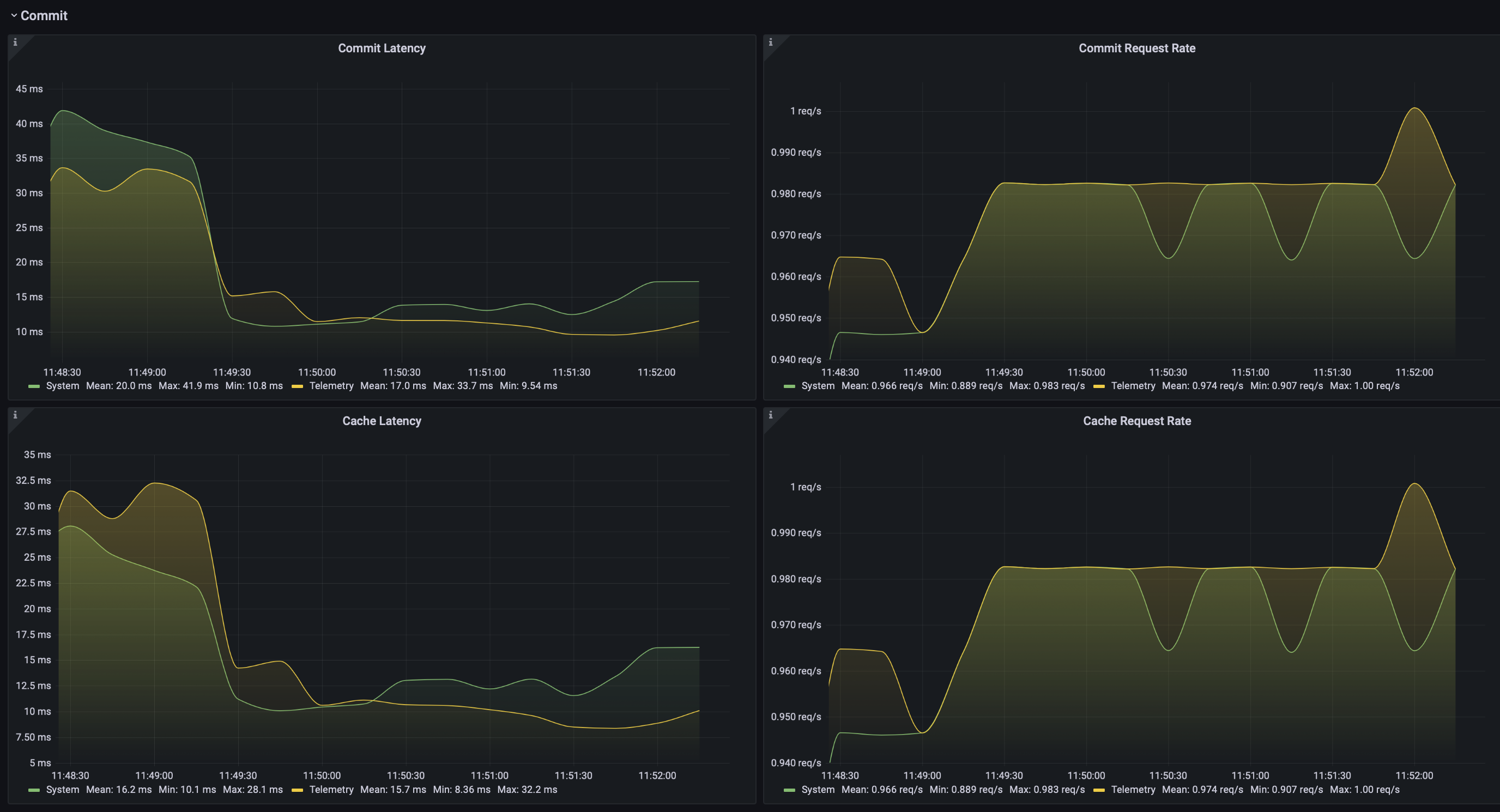
Grafana dashboard panels detailing time series metrics for myosin commit and caching latencies
Developer Tips
Thread-Safety
In multi-threaded environments it is best practice to perform state model checkouts and commits inside the same locked state context. When a model is registered to the system state it is assigned a mutex for synchronizing access to that models resources. The state context requests a mutex for the resource passed into the state context on entry ensuring the checked out copy is up to date. The following code snippet is an example of undefined behaviour:
# `User` lock requested on entry
with State(User) as state:
   user = state.checkout(User)
# `User` lock released; model may no longer be up to date
user.email = "mike@gmail.com"
with State(User) as state:
   # overwrite user model with local copy
   state.commit(user)
Warning
The User model is modified outside the state context and may no longer be up to date. Commiting this model to the state may overwrite more recent changes made to the user model.
To ensure proper resource synchronization perform model checkouts and commits within the same lock context:
with State(User) as state:
   user = state.checkout(User)
   user.email = "mike@gmail.com"
   state.commit(user)
Reducing Latency
The primary cause of latency is long mutex acquisition times. Time spent inside critical sections of should be kept to a minimum. Avoid long blocking function calls while within a locked state context:
with State(User) as state:
   user = state.checkout(User)
   # `User` mutex continually held during long blocking call
   user.email = long_blocking_transaction()
   state.commit(user)
Long blocking function calls should be buffered outside the state context:
email = long_blocking_transaction()
with State(User) as state:
   user = state.checkout(User)
   user.email = email
   state.commit(user)
Logging
Logging state data transactions is critical for debugging. All models implement a pretty print json format which makes it easy to read the state model properties in the logging output. Logging any state model is as easy as passing it to a string formatter:
with State(User) as state:
   # checkout a copy of the user state model
   user = state.checkout(User)
   # modify user state model copy
   user.name = "cS"
   logger.info("User: %s", user)
This will yield a state model properties in json format:
User:
{
   "id": "d6c9e2b4-f07a-4ae4-b36f-30e49739085b",
   "name": "cS",
   "timestamp": 1661661213.072657,
   ...
}
Testing
Unittests can be executed locally by cloning myosin and installing the testing requirements:
git clone git@github.com:ztnel/myosin.git
cd myosin
python3 -m pip install tests/requirements.txt
Run the tests using the nosetests utility:
nosetests
Warning
The nosetests utility is no longer maintained and has compatibility issues with Python 3.10 as noted by this issue thread. Therefore myosin unittests will not be executable on Python 3.10.
I am looking to migrate to pytest and would appreciate support in unit testing.
The test runner will report the executed tests and generate a coverage report. The coverage goal for this library is 95% or greater. If you want to contribute and don’t know how, this is a great place to start.